USB Thermometer Data in Video & Events Triggering to VMS Using AXIS D3110 Connectivity Hub
Displaying real-time temperature data in an Axis camera's video feed, this integration harnesses a USB temperature sensor, feeds live readings into the video as an overlay graphic, and seamlessly communicates event-triggered information to the AXIS Camera Station or other VMS.
About the Project
We're demonstrating the integration of a USB Thermometer with an Axis Network Camera using the AXIS D3110 Connectivity Hub. This combination delivers real-time temperature insights, enhancing operational control and streamlining monitoring.
How Does It Work?
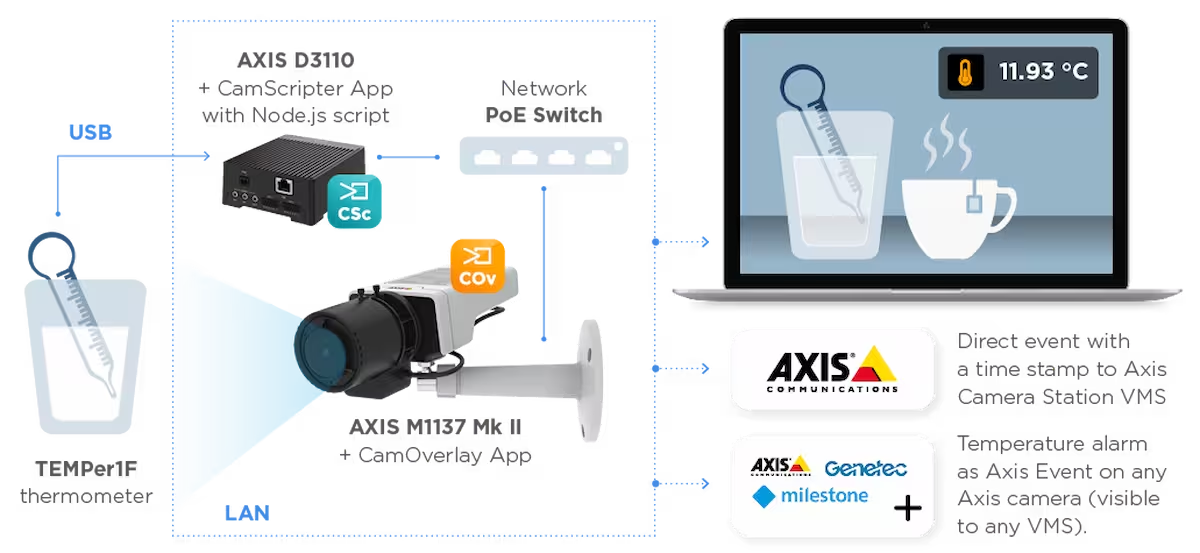
Our setup includes an AXIS M1137 Mk II Box Camera and AXIS D3110 Connectivity Hub connected to one network. The Hub bridges the USB Thermometer and the IP network, enabling smooth communication between the devices. The CamScripter App, installed on the AXIS D3110, uses a Node.js script tailored for USB Thermometer integration. This script, freely accessible on our GitHub, captures real-time temperature data and sends it to the Axis Network Camera. Here, the CamOverlay App displays the data in the live video feed.
This script has three essential functionalities. These multi-faceted functionalities, brought together, expand monitoring capabilities and offer a wide range of operational controls.
- It generates live graphic overlays on the video feed, enriching the visual data with real-time temperature readings.
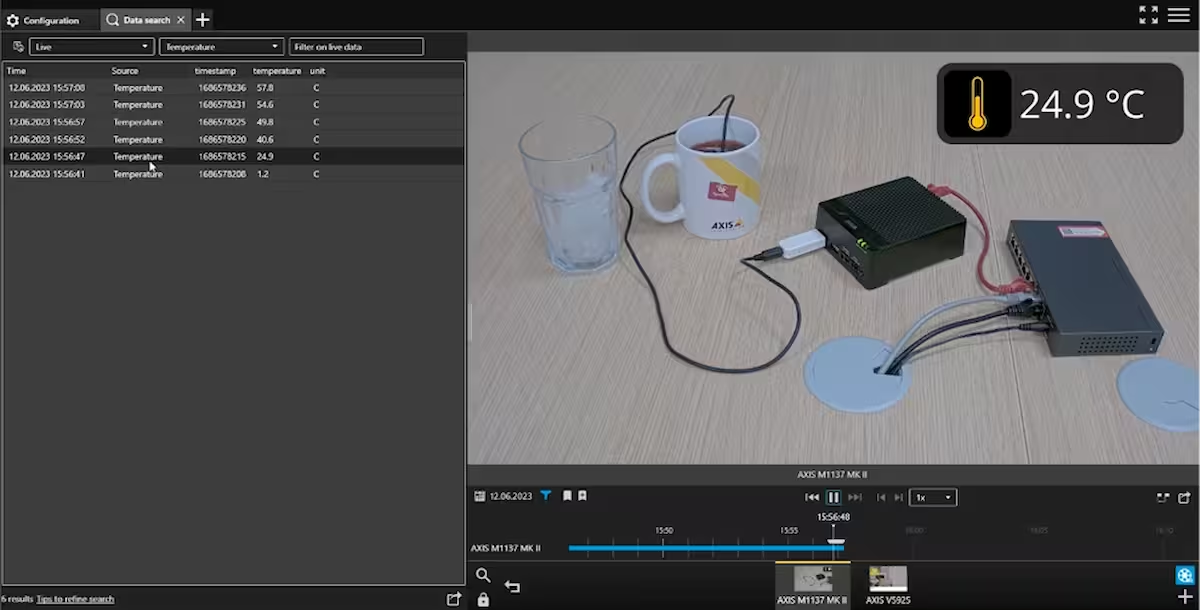
- It creates "external data" for the AXIS Camera Station (ACS). This data can be utilized in the ACS "External Data Search" module to filter video feeds, enhancing search efficiency and precision.
- It generates temperature alarms as AXIS Events when defined conditions are met. These events can be used in action rules directly in the D3110 (but can also be redirected to any camera) or as device events within any VMS system such as Axis Camera Station, Milestone, Genetec, etc. They serve as triggers for various actions; for instance, in our case, they trigger a live view of the camera monitoring the thermometer in ACS whenever a temperature change occurs.
The Result
The integration gives rise to the following functionalities:
- Live Video Output with Dynamic Graphic Overlay: The integration allows live temperature data from the USB Thermometer to be displayed in the video stream via the CamOverlay App. This provides immediate visual insights and enhances environmental monitoring and control.
- Events in Video Management Systems: With the versatility of the Axis Events engine, each temperature change detected by the USB Thermometer triggers a customized event within the VMS. This automatic event logging and organization facilitates effortless search, filtering, and access to relevant recordings.
By harnessing the integration capabilities of a USB Thermometer with an Axis Network Camera via the AXIS D3110 and CamStreamer apps, we can tap into the edge computing capabilities of Axis cameras, taking temperature monitoring to a new level of efficiency and intelligence.
What You Need
Hardware
- AXIS M1137 Mk II Box Camera
- AXIS D3110 Connectivity Hub
- PCsensor USB thermometer with external temperature sensor
Software
The AXIS D3110 Connectivity Hub enables sensor and audio integration into network video systems. It features USB and RS485/RS422 serial ports, eight configurable I/Os, and audio in/outs, allowing you to integrate a broad range of non-visual sensors.
The PCsensor USB thermometer connects via a USB port and includes an external waterproof sensor, with a measuring range from −40ºC to +125ºC (−104ºF to +257ºF).
Any compatible AXIS camera (e.g., AXIS M1137 Mk II) from Axis Communications with an ARTPEC-5/6/7/8 processor can be used for this integration. The full Axis camera portfolio is available at axis.com – just make sure to check compatibility with CamStreamer apps beforehand.
This integration, with the same micro app, also works with Raspberry Pi instead of AXIS D3110. Read about the other integration here.
Setup Guide
Below is the CamScripter App and micro app setup. If you would like help setting up Axis Camera Station VMS, here is the full article on that.
- Open your internet browser and type in the IP address of your AXIS D3110 Connectivity Hub to open CamScripter App UI. If the Axis device is on HTTPS select the protocol HTTPS (insecure). The same applies for sending events to Axis Camera Station, which is always on HTTPS, but without registered and valid certificates you must use HTTPS (insecure).
- Upload the TEMPer1f Sensor package (available for free on GitHub).
- Click "Start" to launch the micro application.
- To set up the thermometer, open CamScripter App UI in your browser and access the TEMPer1f Sensor via the gear button next to the installed thermometer package.
Temperature Settings
Basic settings of USB thermometer – choose Celsius or Fahrenheit as a unit.
CamOverlay App Integration
Set up a connection to an Axis network camera with CamOverlay App onboard – a graphic overlay with the real-time temperature will be displayed in the camera video.
Axis Camera Station
Configure the connection to the computer on the network where the Axis Camera Station VMS is running, including when to send a timestamped event to the VMS.
Axis Camera Events
Axis event generation settings. If the event is to be generated directly on the D3110, then you can use the local host address 127.0.0.1, if the event is to be generated on another camera, then fill in the data for that camera. In this case though the CamScripter App must be installed on the camera as well. Plus, you are setting the logic of when to create the event. Then you can then trigger many actions based on the events in your VMS.